【Pygame Zero】簡単なゲーム05:今日の運勢は?boon占いスロット
ratch2025
Pythonしよう!
こんにちは!
「Pythonしよう!楽しく学べるプログラミング教室」の
ラッチ先生です


スックです。よろしくね!
BGM提供: DOVA-SYNDROME
https://dova-s.jp/
・ 「Are You Ready? 」 written by FLASH☆BEAT
効果音提供:otosozai.com
https://otosozai.com/
・ 「se_sac02」: コミカル
・ 「se_sad04」: 効果音
・ 「se_moc07」: 効果音
・ 「se_sud02」 :着信音
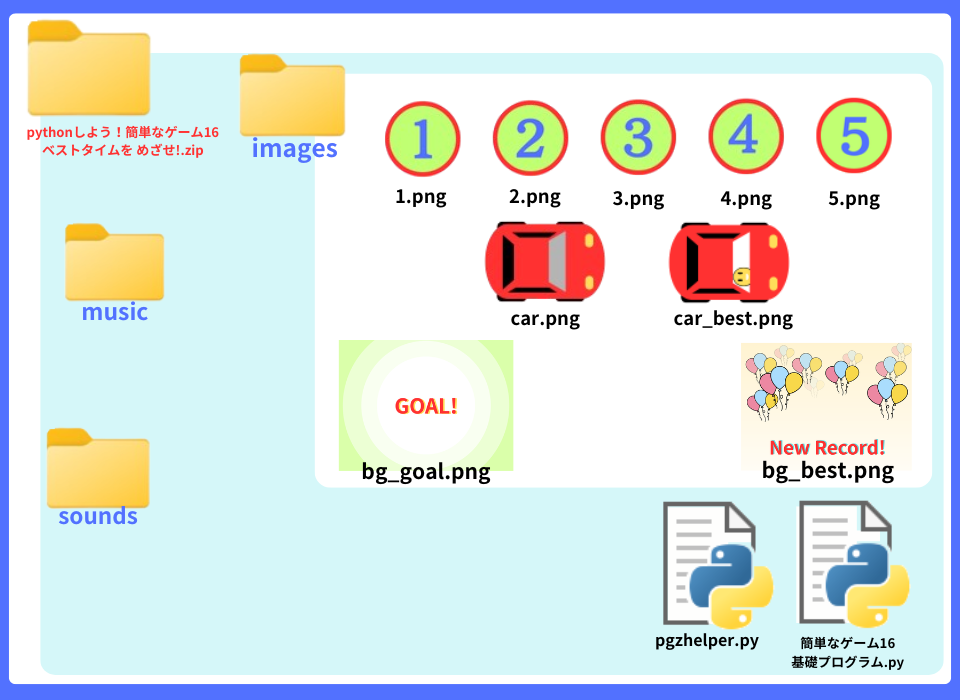
基礎プログラムと 画像を入れた
「簡単なゲーム16: ベストタイムを めざせ!」zipフォルダを
ダウンロードしてください
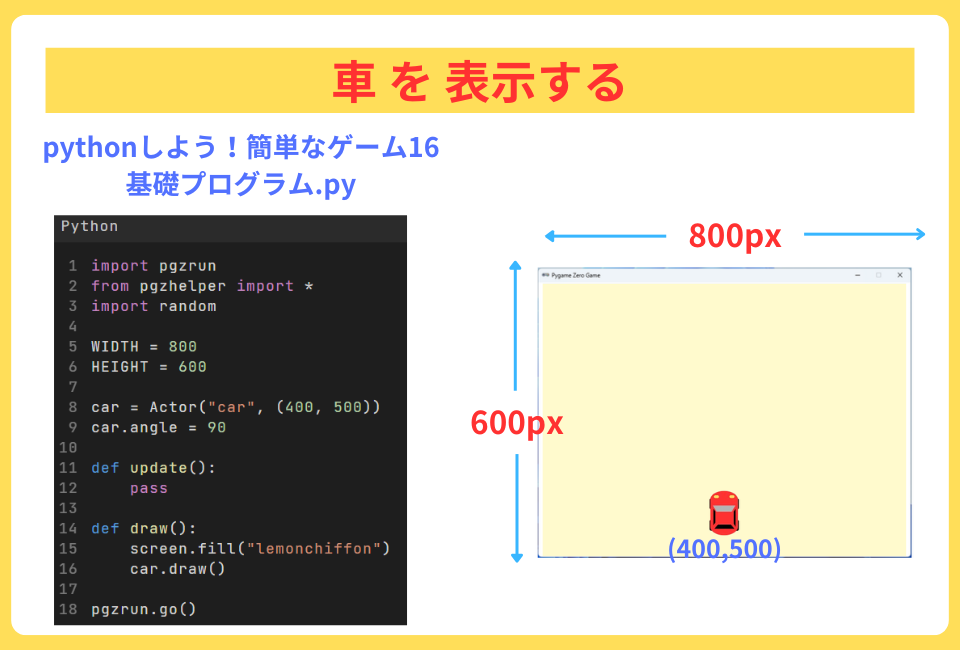
今回は、スクリーンの色を “lemonchiffon“にしたよ
「原色大事典」サイトには、URL:https://www.colordic.org/
pygame zeroで使える色が載っています
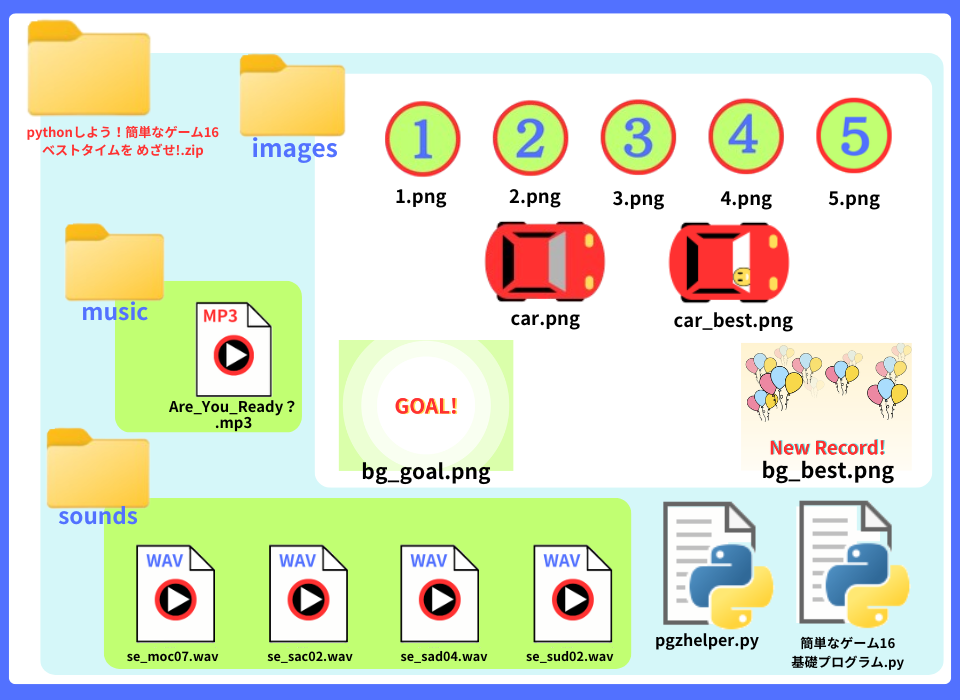
このゲームで使用している音声ファイルは、
以下のサイトからお借りしています。
各自でダウンロードして、該当するフォルダに入れてください!
BGM提供: DOVA-SYNDROME
https://dova-s.jp/
・ 「Are You Ready? 」 written by FLASH☆BEAT
効果音提供:otosozai.com
https://otosozai.com/
・ 「se_sac02」: コミカル
・ 「se_sad04」: 効果音
・ 「se_moc07」: 効果音
・ 「se_sud02」 :着信音
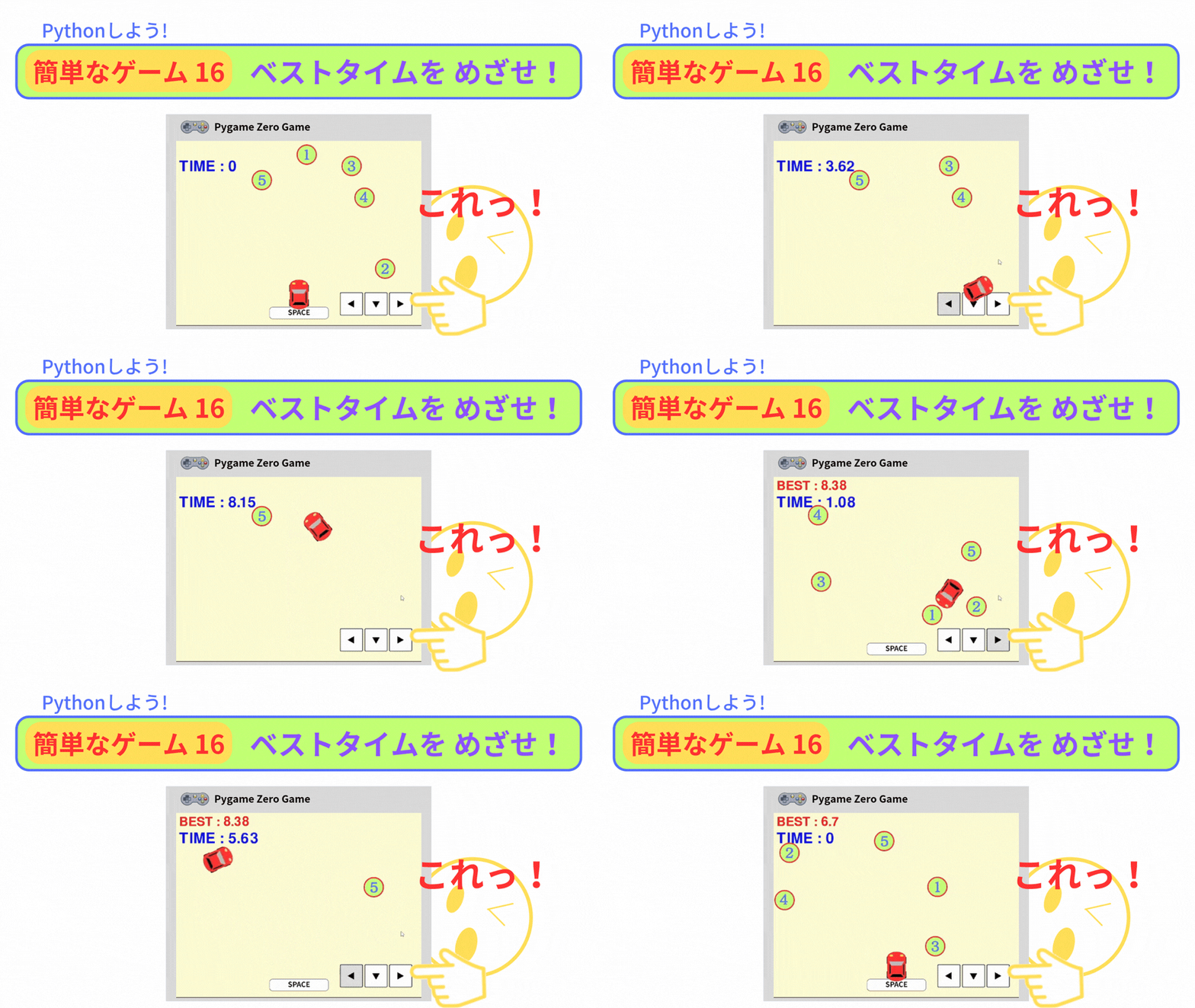
今回の「ベストタイムを めざせ!」では、
・車が 動かす
・ポイントを ランダムに配置する
プログラムがあります。
そこで、2つのモジュールを 用意しました
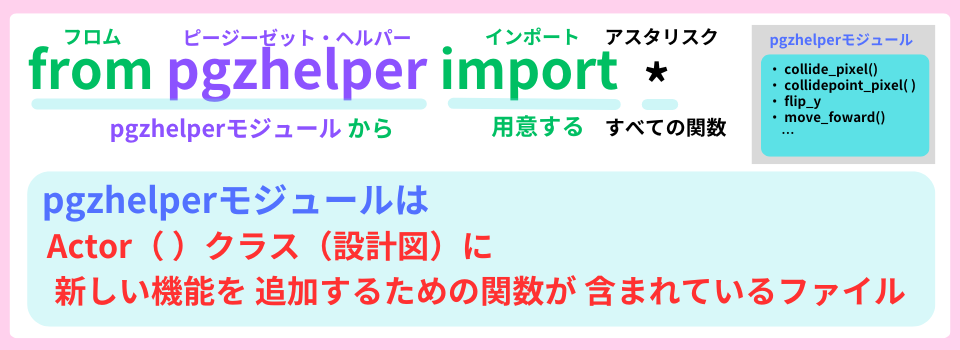
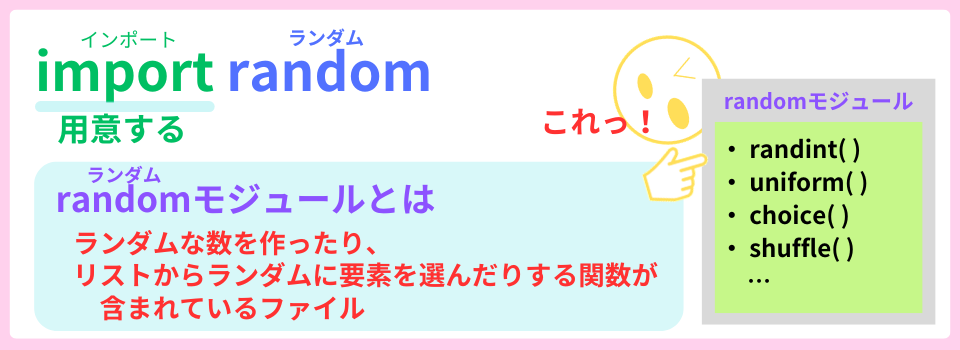
モジュールとは、
関数やプログラムが書かれているファイルのことだよ
Actor()クラスが入っている変数carには、
carを動かす属性(データ)やメソッド(命令)が あります。
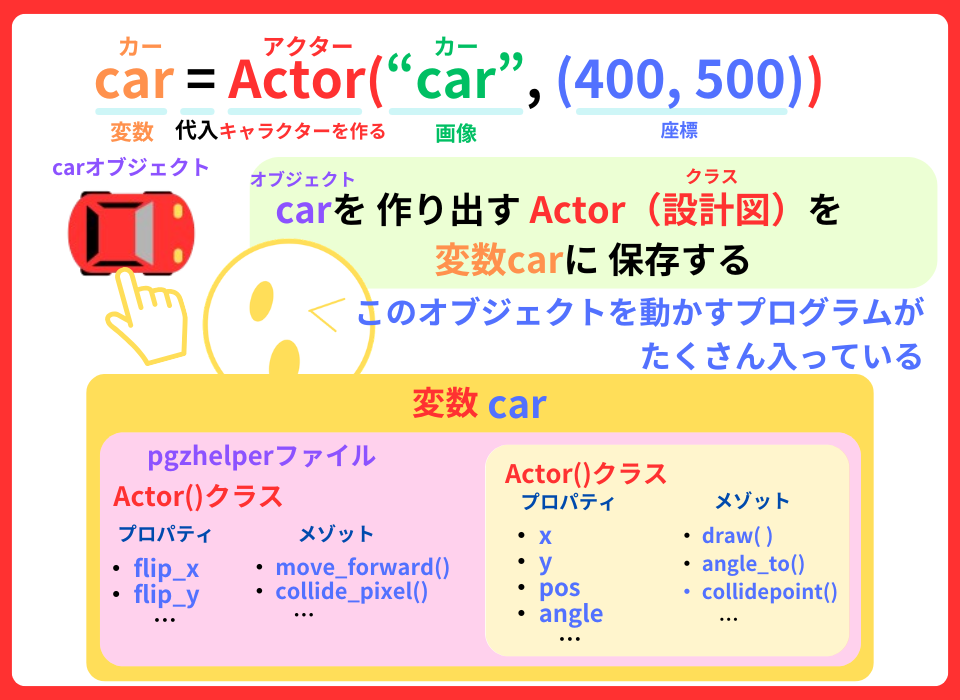
属性(データ)やメソッド(命令)は、
『 . (ドット)』を付ければ、使えるよ
今回は、
スクリーンに タイマーを表示します・
0.01秒ずつ増えていくタイマーを作るよ
最初に
スペースキーを押したら 車を動くプログラムを作りましょう
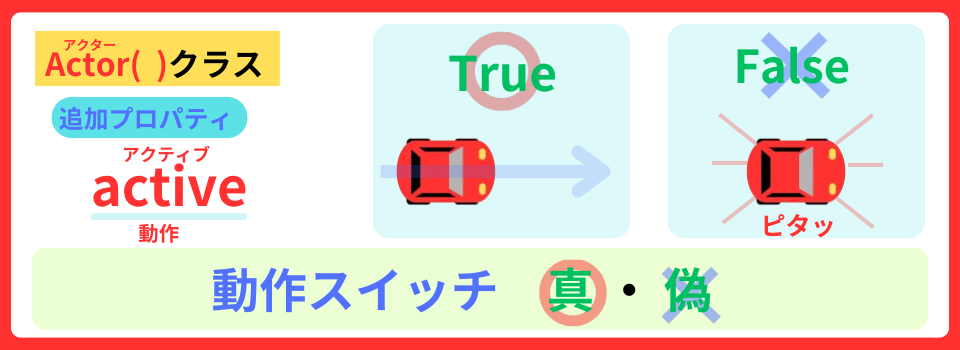
プロパティactiveを追加して、
True/False で 車が動かすスイッチにします
car.angle = 90
car.active = False  #1 プロパティactiveに Falseを設定する

def on_key_down(key): #2 キーが 押されたプログラムを 定義する
    if key == keys.SPACE: #3 もし スペースキーが 押されたら
        car.active = True #4プロパティactiveに Trueを設定する

def update():スペースキーを押したら True になったね
つぎに、def car_move()関数で、車の動きを定義しよう。
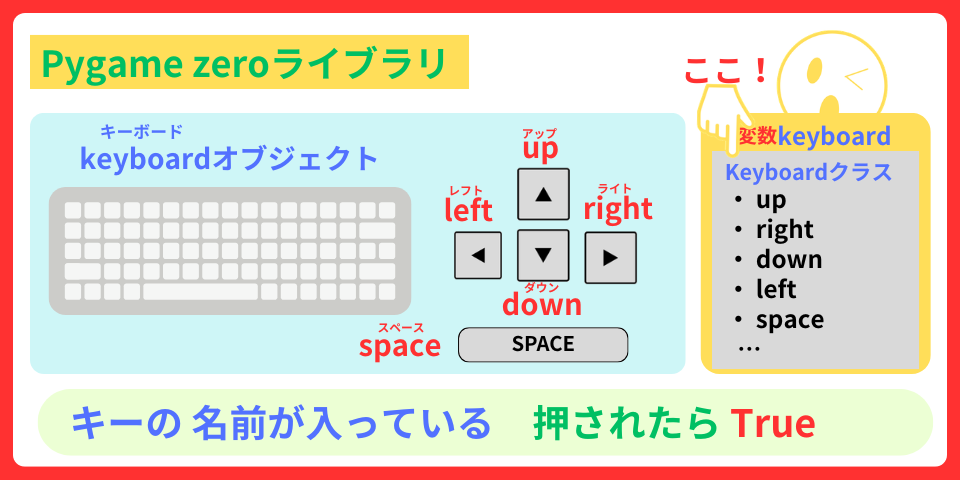
keyboardオブジェクトを使って
左右キーを使って 車を動かすよ
def car_move(): #1 car_move()関数を 定義する
    if car.active: #2 もし プロパティactiveが Trueなら
        if keyboard.right: #3 もし 右キーが 押されたら
            car.angle -= 3 #4 車の向きを 3° 減らす

        if keyboard.left: #5 もし 左キーが 押されたら
            car.angle += 3 #6 車の向きを 3° 増やす

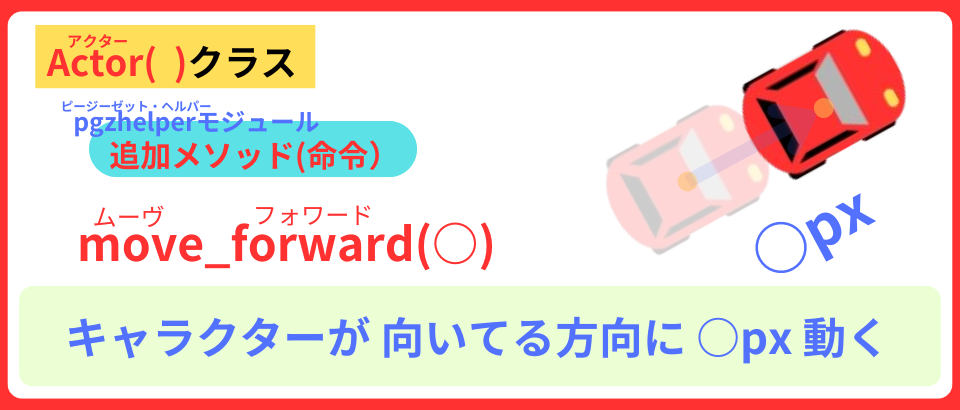
        car.move_forward(5) #7 5pxずつ動かす

def update():
    car_move() #8 car_move()関数を 実行する

あれれっ! 車が どっかへ行っちゃったよ
それでは、上下左右の端に当たったら 跳ね返るようにしよう
バウンディングボックスを使って プログラムを作ります。
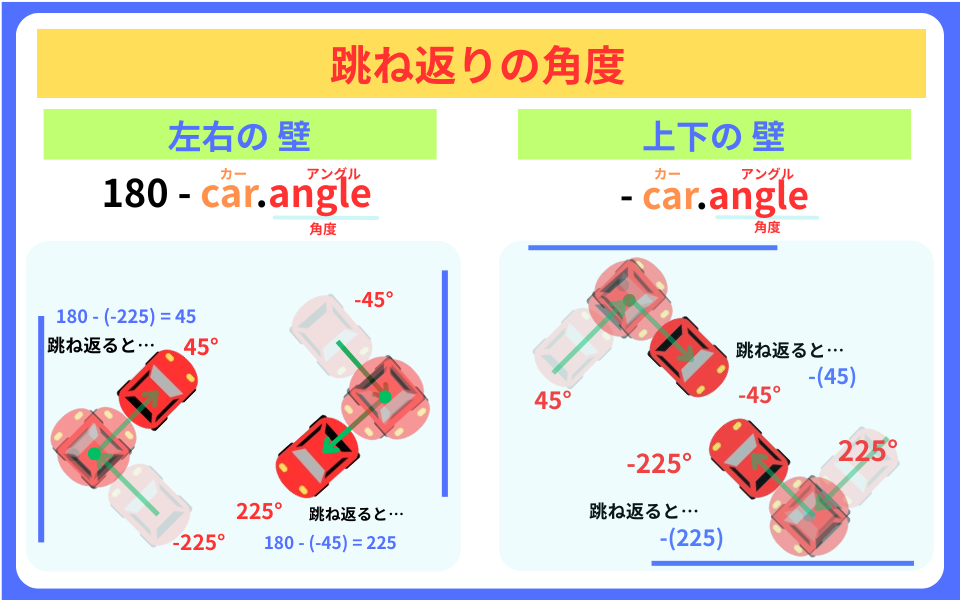
跳ね返りの角度の出し方です。
def car_move():
    if car.active:
        if keyboard.right:
            car.angle -= 3

        if keyboard.left:
            car.angle += 3

        car.move_forward(5)

        if car.left < 0 or car.right > WIDTH: #1 左右の壁に当たったら
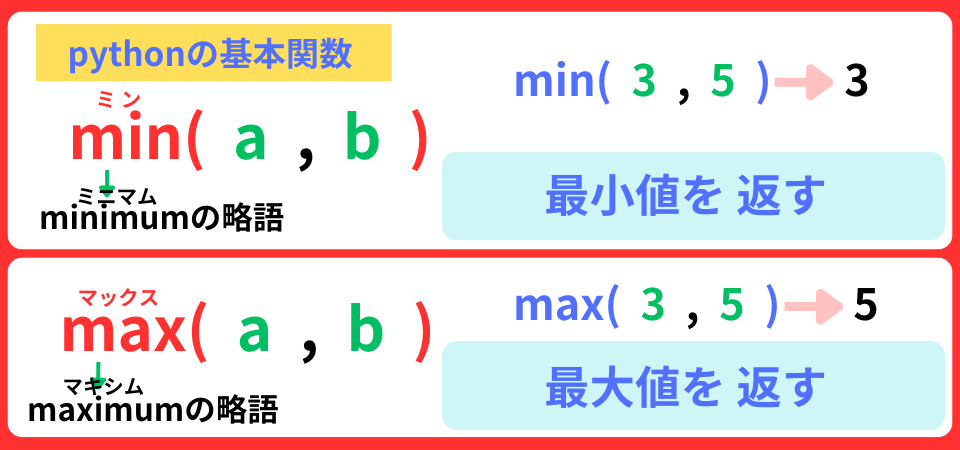
            car.left = max(car.left, 0) #2 左は、 左と0の大きい方を設定する
            car.right = min(car.right, WIDTH) #3 右は 右と800の小さい方を設定する
            sounds.se_sac02.play() #4 効果音を 鳴らす
car.angle = 180 - car.angle #5 向きに 跳ね返った角度を設定する 効果音提供:otosozai.com
https://otosozai.com/
・ 「se_sac02」: コミカル
今度は、上下の跳ね返りです。
def car_move():
    if car.active:
        if keyboard.right:
car.angle -= 3 if car.top < 0 or car.bottom > HEIGHT: #1 上下の壁に当たったら
car.top = max(car.top, 0) #2 上は、上と0の大きい方を設定する
car.bottom = min(car.bottom, HEIGHT) #3 下は 下と600の小さい方を設定する
sounds.se_sac02.play() #4 効果音を 鳴らす
car.angle = -car.angle #5 向きに 跳ね返る角度を設定する
def update():これで、車を動かすプログラムは完成!
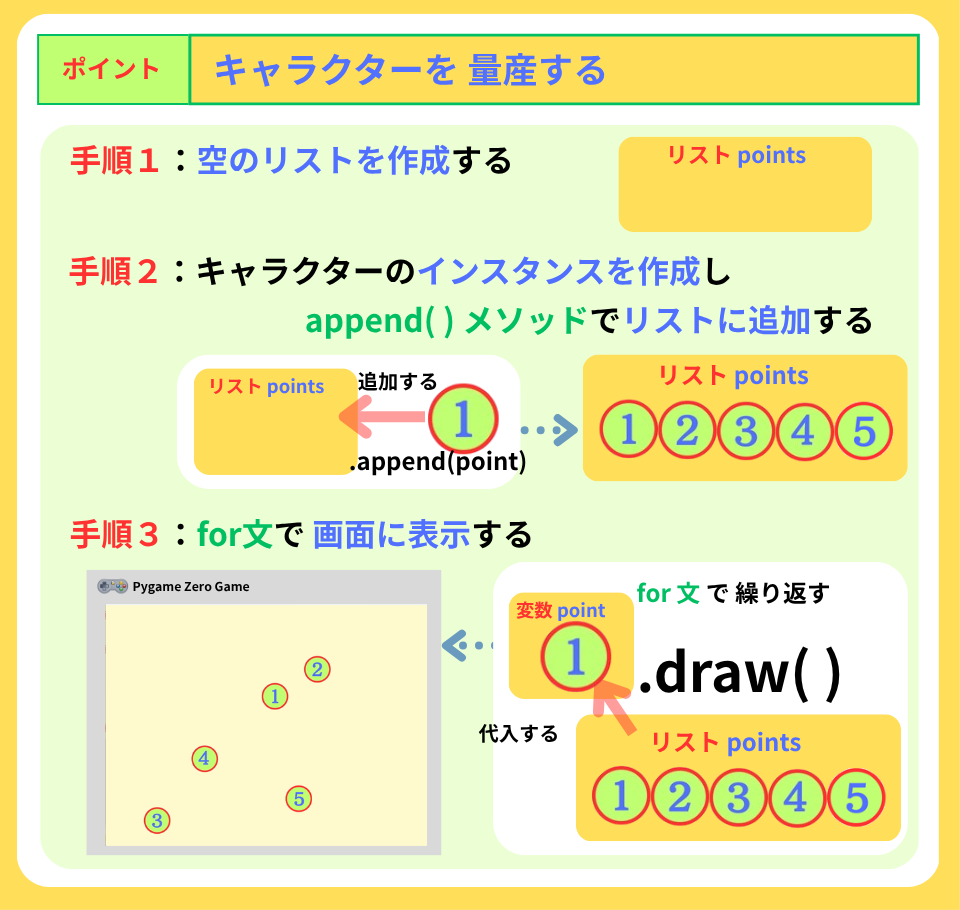
5つのポイントを ランダムに配置しましょう
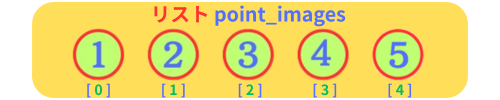
リスト:point_images には、
用意したポイントの画像を 入れましょう
car.active = False
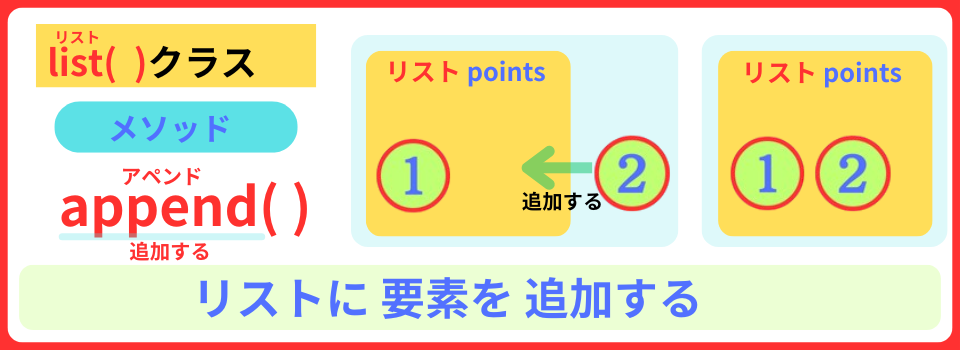
points = [] #1 空のリストpointsを 準備する
point_images = ["1", "2", "3", "4", "5"] #2 リストpoint_imagesに 画像1~5 を代入する
def create_point(): #3 create_point関数を 定義する
for i in range(5): #4 5回繰り返す
x = random.randint(35, WIDTH-35) #5 変数xに 35~765からランダムに選んだ数値を 設定する
y = random.randint(35, HEIGHT-35) #6 変数yに 35~565からランダムに選んだ数値を 設定する
point = Actor(point_images[i], (x, y)) #7 ポイントを生成する 画像は i番目
point.num = i #8 プロパティ番号に カウント変数iを設定する
points.append(point) #9 リストpointsに 追加する
create_point() #10 create_point()関数を 実行するdef draw():
screen.fill("lemonchiffon")
for point in points: #11 リストpointsから ポイントを取り出す
point.draw() #12 ポイントを表示する
car.draw()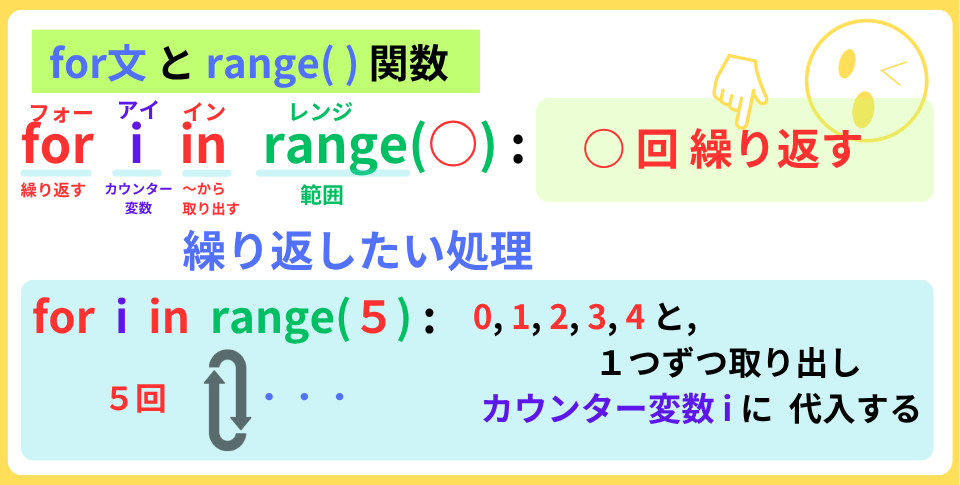
あれっ⁉ 車の下に 配置されたり、
ポイント同士 重なる時も あるねぇ…
そういう時は、
ポイントを配置する条件を 作成しましょう
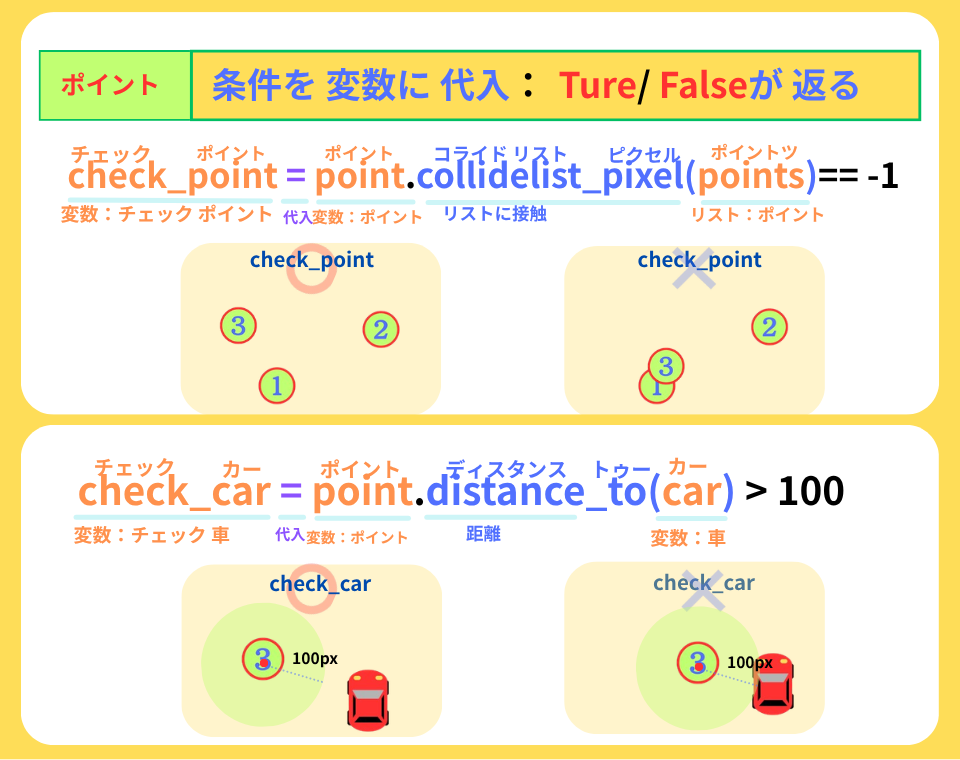
★ ポイントを配置する 条件 ★
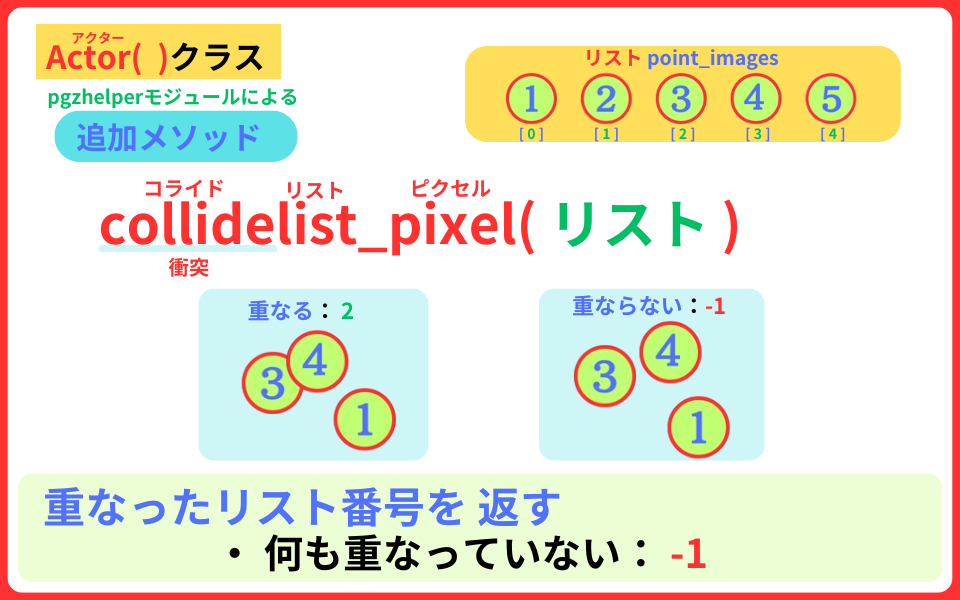
1. 変数check_point :ポイント同士 重ならない
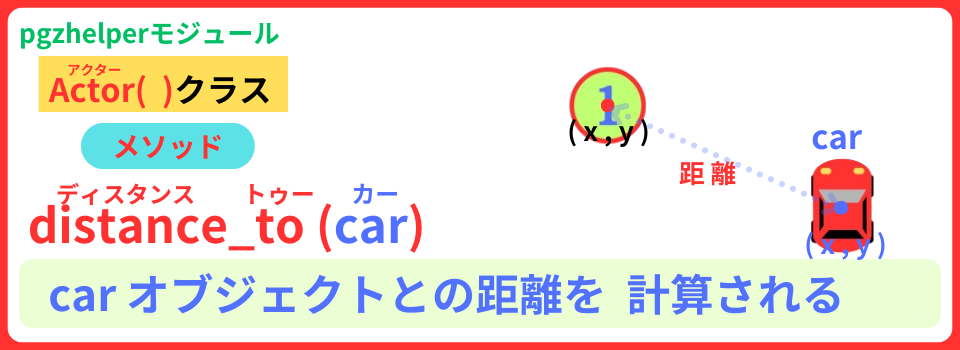
2. 変数check_car : 車から 100px 以上 離れる
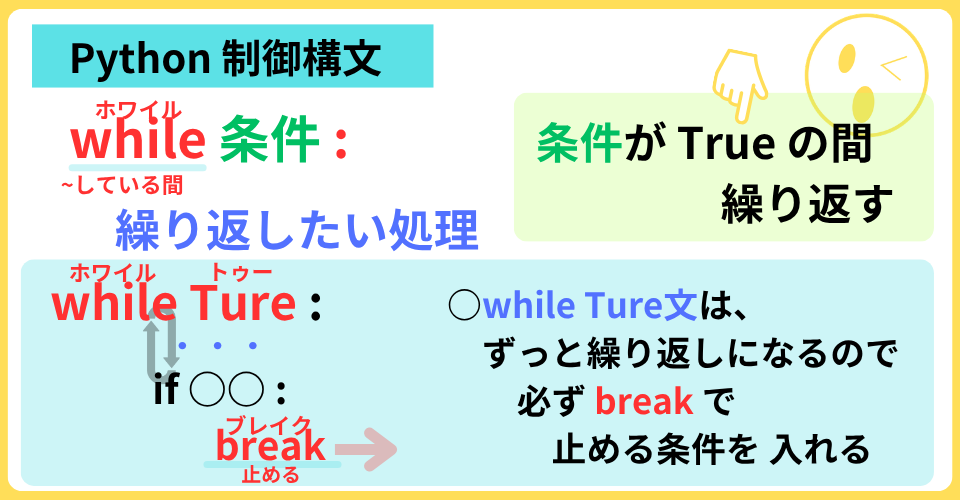
while True: 構文で ポイントの場所を決めましょう
2つの条件が Trueになったら
break で このwhile構文を抜けて、 リストpoints に 追加しましょう
def create_point():
for i in range(5):
while True: #1 繰り返す
x = random.randint(35, WIDTH-35)
y = random.randint(35, HEIGHT-35)
point = Actor(point_images[i], (x, y))
point.num = i
check_point = point.collidelist_pixel(points) == -1 #2 変数check_pointに 条件:他のポイントとは 重ならないを 代入する
check_car = point.distance_to(car) > 100 #3 変数check_carに 条件:車との距離を 100px以上にするを 代入する
if check_point and check_car: #4 2つの条件ともTureなら
break #5 抜ける
points.append(point) 
おおっ!お見事!
get_point()関数で、
順番にポイントに触れたら きえるよう 定義しましょう
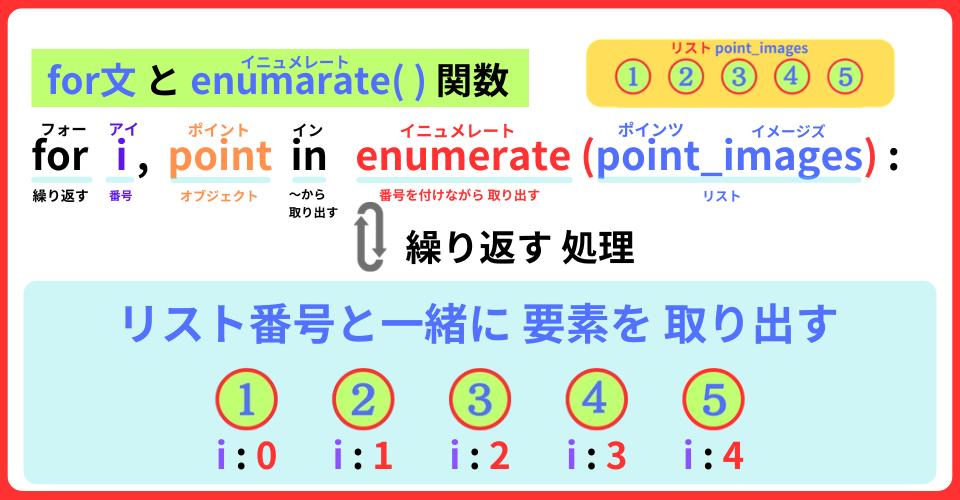
enumerate( )関数を 使って
リストpoints から ポイントと リスト番号も いっしょに取り出すよ
point_images = ["1", "2", "3", "4", "5"]
def get_point(): #1 get_point()関数を定義する
for i, point in enumerate(points): #2 リスト番号と ポイントを取り出す
if point.collide_pixel(car) and i==0: #3 もし 車に 触れ かつ リスト番号が 0 なら
sounds.se_sad04.play() #4 効果音を 鳴らす
points.remove(point) #5 ポイントを リストpointsから削除するdef update():
car_move()
get_point() #6 get_point()関数を 実行する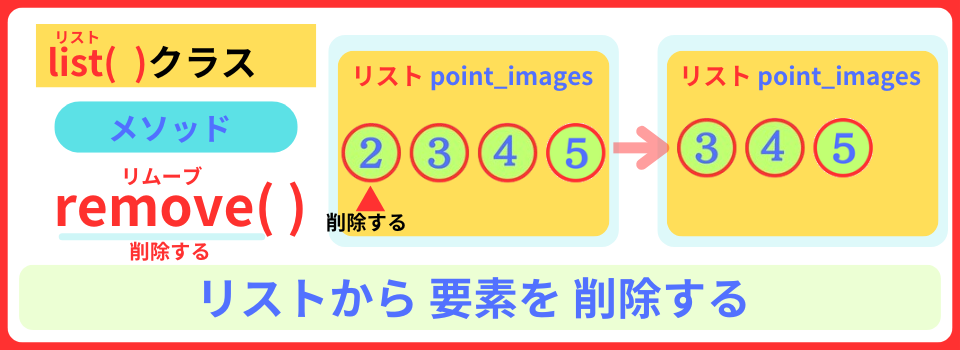
効果音提供:otosozai.com
https://otosozai.com/
・ 「se_sad04」: 効果音
なるほど!
リストに入っている最初のポイントに触れれば
削除するように プログラムしたのね
そうです!スック。
次は、timer()関数で タイマーを定義しましょう
point_images = ["1", "2", "3", "4", "5"]
time = 0 #1 変数time 初期値:0
def timer(): #2 timer()関数を 定義する
global time #3 グローバル変数 time
time += 0.01 #4 変数timeを 0.01ずつ増える
time = round(time, 2) #5 変数timeを 小数点2桁にするdef on_key_down(key):
if key == keys.SPACE:
car.active = True
music.play("are_you_ready?") #7 BGMを 流す
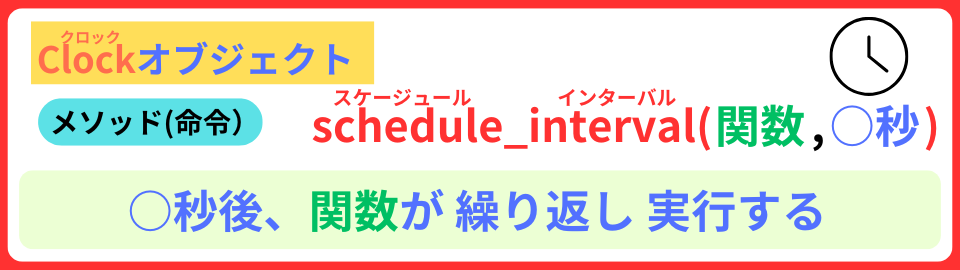
clock.schedule_interval(timer, 0.01) #8 0.01秒ごとに タイマーを 実行するdef draw():
screen.fill("lemonchiffon")
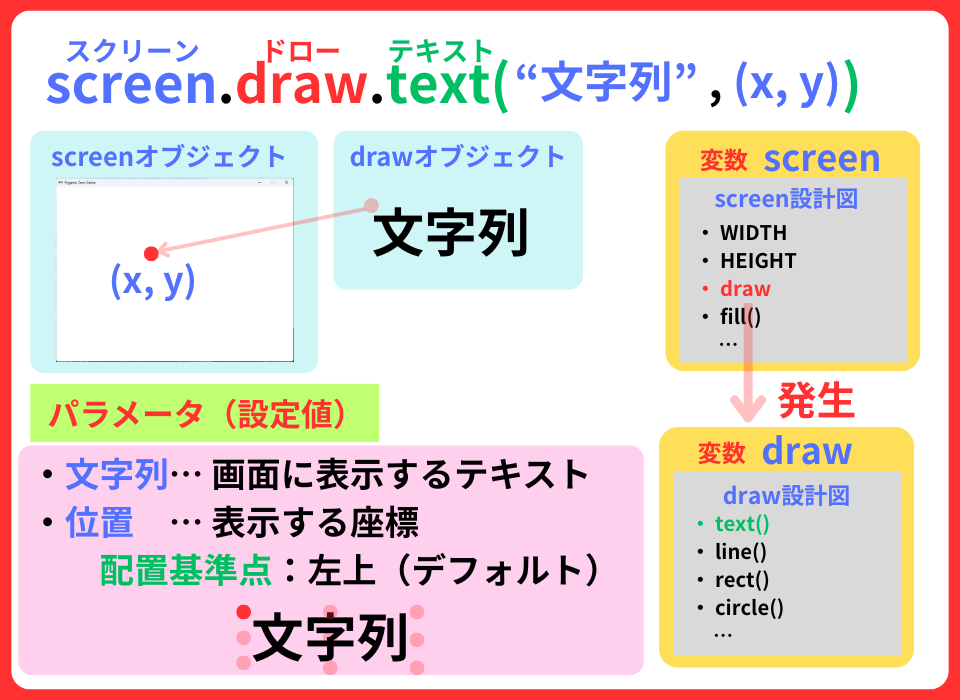
screen.draw.text(f"TIME : {time}",
topleft=(10, 60),
fontsize=70,
color="blue") #6 タイマーを 表示する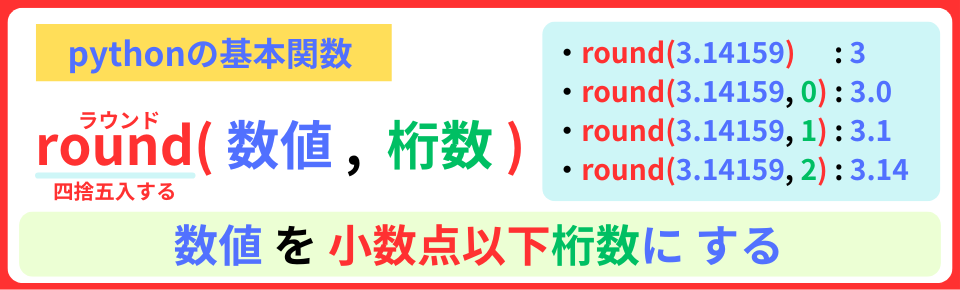
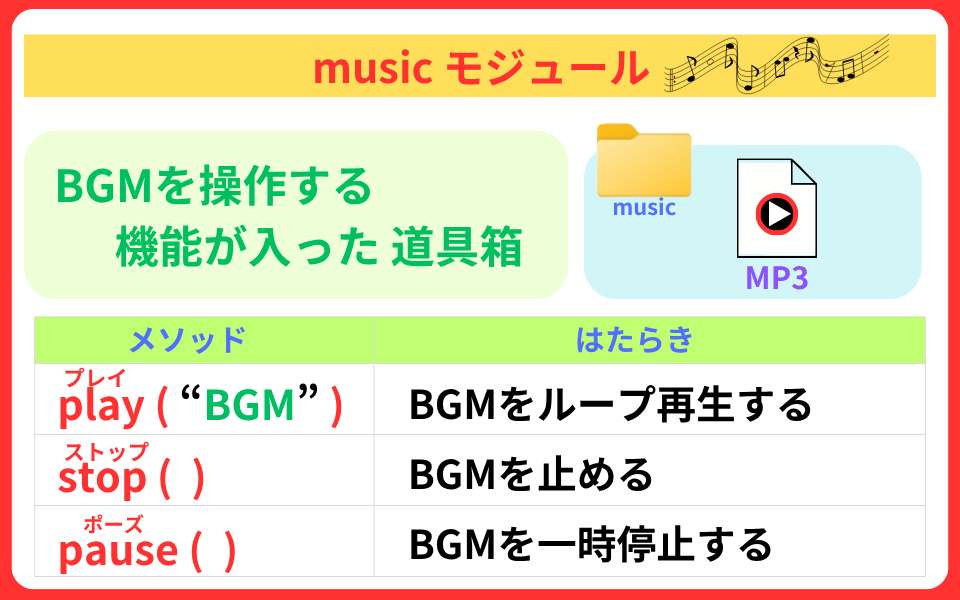
BGM提供: DOVA-SYNDROME
https://dova-s.jp/
・ 「Are You Ready? 」 written by FLASH☆BEAT
あれっ? タイマーが 止まらないね…
大丈夫!
ちゃんとタイマーを止めるプログラムを作りますね
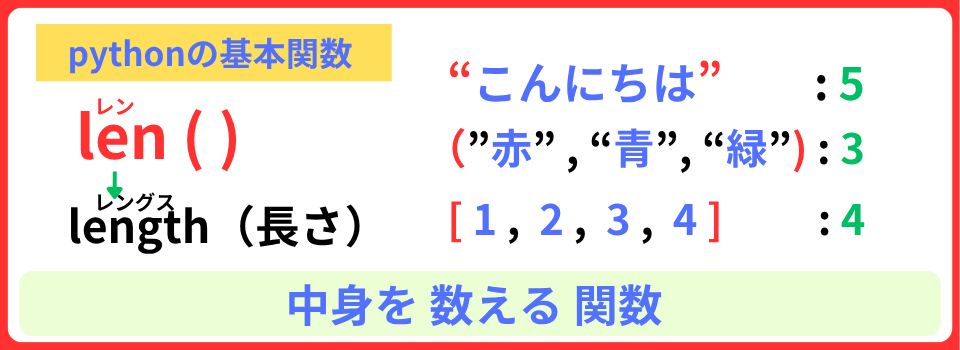
len()関数を使って、ポイントが なくなったらゴールです
def get_point():
for i, point in enumerate(points):
if point.collide_pixel(car) and i==0:
sounds.se_sad04.play()
points.remove(point)
if len(points) == 0: #1 もし リストpointsの要素が 0になったら
clock.unschedule(timer) #2 timer関数を 止める
music.stop() #3 BGMを 止める
car.active = False #4 プロパティactiveを Falseに設定するおおっ!タイマーが止まったね
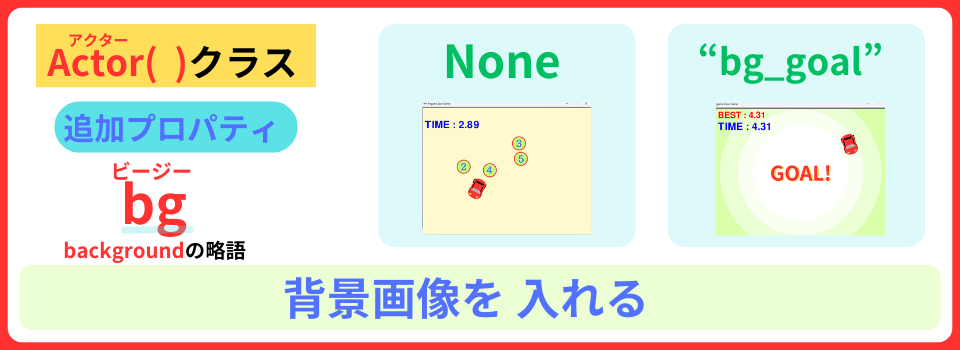
プロパティ bg を追加して、
ゴールしたら、背景画像が表示できるようにしよう
car.active = False
car.bg = None #1 プロパティbgに None(無し)を設定するdef get_point():
for i, point in enumerate(points):
if point.collide_pixel(car) and i==0:
sounds.se_sad04.play()
points.remove(point)
if len(points) == 0:
clock.unschedule(timer)
music.stop()
car.active = False
sounds.se_sud02.play() #2 効果音を 鳴らす
car.bg = "bg_goal" #3 プロパティbgに "bg_goal"画像を設定するdef draw():
if car.bg: #4 もし プロパティbgに 画像が入ったら
screen.blit(car.bg, (0, 0)) #5 プロパティbgの背景画像を表示する
else: #6 その他
screen.fill("lemonchiffon")効果音提供:otosozai.com
https://otosozai.com/
・ 「se_sud02」 :着信音
ゴールしたことが わかるね
Rキーを押したら、リスタートできるよう
def reset() 関数を 定義しましょう
time = 0
def reset(): #1 reset()関数を 定義する
global time #2 グローバル変数 time
car.image = "car" #3 車の画像を carに設定する
car.pos = (400, 500) #4 車の位置を (400, 500)に設定する
car.angle = 90 #5 車の向きを 90°に設定する
car.bg = None #6 背景画像を None(無し)に設定する
time = 0 #7 変数timeに 0を代入する
create_point() #8 create_point()関数を 実行するdef on_key_down(key):
if key == keys.SPACE:
car.active = True
music.play("are_you_ready?")
clock.schedule_interval(timer, 0.01)
elif key == keys.DOWN: #9 もし 下ボタンを押したら
reset() #10 reset()関数を 実行するこれで、何回もチャレンジできるね
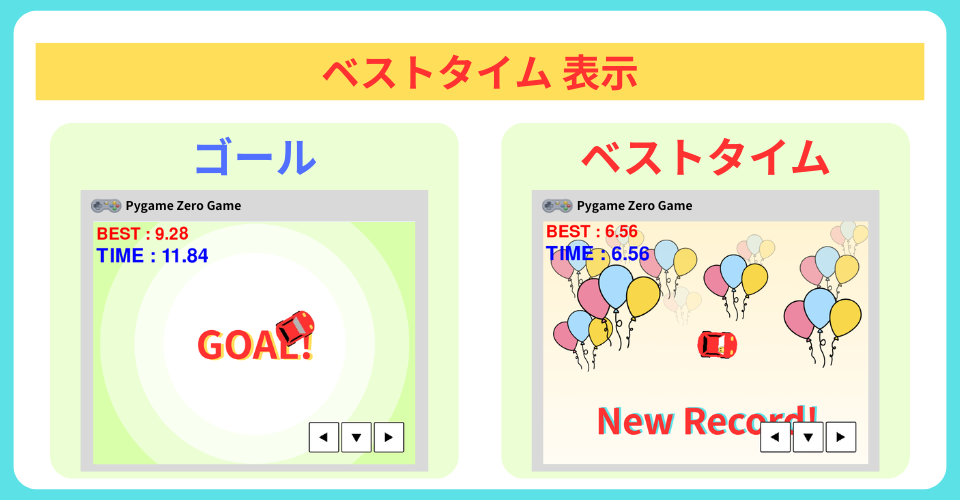
さあ、ベストタイムを 表示させましょう!
準備として、
・ 変数 best_time : ベストタイムを 入れる
を 用意して、初めのタイムを 最初のベストタイムにします
time = 0
best_time = None #1 変数best_timeに None(無し)を設定するdef get_point():
global best_time #2 グローバル変数best_time
for i, point in enumerate(points):
if point.collide_pixel(car) and i==0:
sounds.se_sad04.play()
points.remove(point)
if len(points) == 0:
clock.unschedule(timer)
music.stop()
car.active = False
if not best_time: #3 もし 変数best_timeに データが入っていなかったら
best_time = time #4 変数best_timeに 変数timeのデータを 代入する
sounds.se_sud02.play()
car.bg = "bg_goal" def draw():
if car.bg:
screen.blit(car.bg, (0, 0))
else:
screen.fill("lemonchiffon")
if best_time: #5 もし 変数best_timeに データが入っていたら
screen.draw.text(f"BEST : {best_time}",
topleft = (10, 10),
fontsize=60,
color="red") #5 変数best_timeを 表示するあれっ?ベストタイムを 出しているのに 変わらないよ
だいじょうぶ!
2回目以降は、ベストタイムより早いタイムを出したら
更新するプログラムを作るよ
def get_point():
global best_time
for i, point in enumerate(points):
if point.collide_pixel(car) and i==0:
sounds.se_sad04.play()
points.remove(point)
if len(points) == 0:
clock.unschedule(timer)
music.stop()
car.active = False
if (best_time and #1 もし変数best_timeに データがあり
best_time >= time): #2 かつ 変数beat_timeより 変数timeが小さいなら
best_time = time #2 変数best_timeに 変数timeの当たりを 代入する
sounds.se_moc07.play() #3 効果音を 鳴らす
car.image = "car_best" #4 車の画像を "car_best"に設定する
car.bg = "bg_best" #5 プロパティbgに "bg_best"画像を設定する
else: #6 その他は
if not best_time:
best_time = time 効果音提供:otosozai.com
https://otosozai.com/
・ 「se_moc07」: 効果音
今回の学習は、これで 終了! おつかれさま
今回は、
ベストタイムを表示するプログラムを作りました。
import pgzrun
from pgzhelper import *
import random
WIDTH = 800
HEIGHT = 600
car = Actor("car", (400, 500))
car.angle = 90
car.active = False
car.bg = None
points = []
point_images = ["1", "2", "3", "4", "5"]
time = 0
best_time = None
def reset():
global time
car.image = "car"
car.pos = (400, 500)
car.angle = 90
car.bg = None
time = 0
create_point()
def timer():
global time
time += 0.01
time = round(time, 2)
def get_point():
global best_time
for i, point in enumerate(points):
if point.collide_pixel(car) and i==0:
sounds.se_sad04.play()
points.remove(point)
if len(points) == 0:
clock.unschedule(timer)
music.stop()
car.active = False
if (best_time and
best_time >= time):
best_time = time
sounds.se_moc07.play()
car.image = "car_best"
car.bg = "bg_best"
else:
if not best_time:
best_time = time
sounds.se_sud02.play()
car.bg = "bg_goal"
def create_point():
for i in range(5):
while True:
x = random.randint(35, WIDTH-35)
y = random.randint(35, HEIGHT-35)
point = Actor(point_images[i], (x, y))
point.num = i
check_point = point.collidelist_pixel(points) == -1
check_car = point.distance_to(car) > 100
if check_point and check_car:
break
points.append(point)
create_point()
def on_key_down(key):
if key == keys.SPACE:
car.active = True
music.play("are_you_ready?")
clock.schedule_interval(timer, 0.01)
elif key == keys.DOWN:
reset()
def car_move():
    if car.active:
        if keyboard.right:
            car.angle -= 3
if keyboard.left:
car.angle += 3
car.move_forward(5)
if car.left < 0 or car.right > WIDTH:
car.left = max(car.left, 0)
car.right = min(car.right, WIDTH)
sounds.se_sac02.play()
car.angle = 180 - car.angle
if car.top < 0 or car.bottom > HEIGHT:
car.top = max(car.top, 0)
car.bottom = min(car.bottom, HEIGHT)
sounds.se_sac02.play()
car.angle = -car.angle
def update():
car_move()
get_point()
def draw():
if car.bg:
screen.blit(car.bg, (0, 0))
else:
screen.fill("lemonchiffon")
if best_time:
screen.draw.text(f"BEST : {best_time}",
topleft = (10, 10),
fontsize=60,
color="red")
screen.draw.text(f"TIME : {time}",
topleft=(10, 60),
fontsize=70,
color="blue")
for point in points:
point.draw()
car.draw()
pgzrun.go()タイマーを表示する時
小数の場合は、 round( )関数 を使って小数点以下の桁数を
そろえましょう
みんなも、タイマー付きのゲームをつくってみよう!
それじゃあ、またね!